
Anti-Piracy
Purchasing Genuine Software
Answering the following 5 questions can help protect you from counterfeit software.
To help you determine that what you are receiving is genuine software.
- Are you buying from a reputable reseller?
Protect yourself from purchasing counterfeit software by buying from resellers who sell only genuine Microsoft software. Locate a reputable reseller using local resources such as a Chamber of Commerce, the Better Business Bureau, and consumer publications.In addition to local resellers, you also have digital download purchase options for Microsoft software.
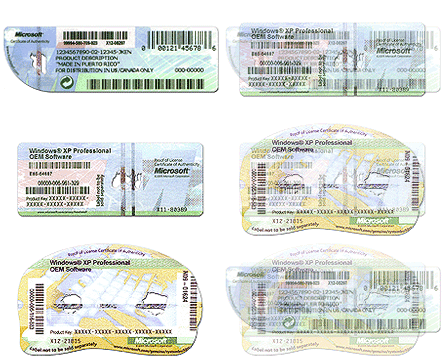
- Is a Certificate of Authenticity (COA) included?
A Certificate of Authenticity (COA) is a label that helps you identify genuine Microsoft software. Retail Microsoft software ships with a COA affixed to the outside of the packaging. If a COA is not present on the packaging, it is not genuine software and is not properly licensed. A COA should never be purchased without the software it authenticates.
- Is a hologram CD, DVD, or recovery media included?
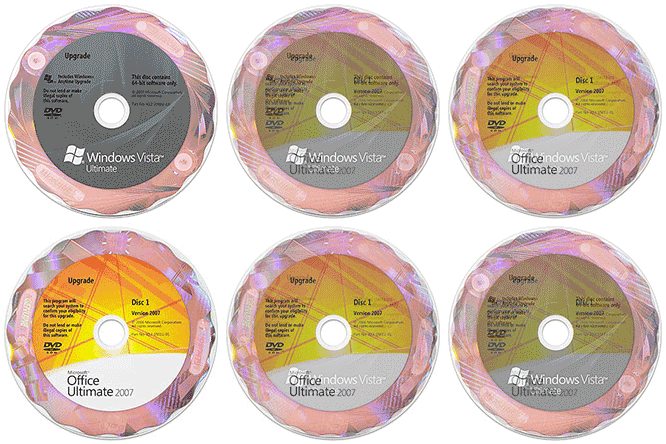 Many Microsoft products ship on hologram CDs or DVDs in order to protect against counterfeiting.A hologram disc features a holographic image on the surface of the disc. This holographic image is part of the disc itself; it is not a sticker.Note: Genuine Windows software purchased with a new computer may come with recovery media. Recovery media is an installation disc used to restore your Microsoft software in case it fails. Your computer manufacturer should provide a means of recovering your genuine Microsoft software. This may include a hologram CD, DVD, or another form of media.
 - Are the product packaging and documentation high quality?
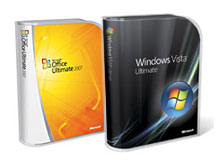
One of the clearest indications that you are purchasing genuine Microsoft software is professionally produced packaging and documentation.Note: Microsoft will never print a product key directly on the software packaging and it should not be visible prior to purchase. If you've received a package with a product key displayed, you are not getting genuine Microsoft software.
- Is an End-user License Agreement (EULA) included?
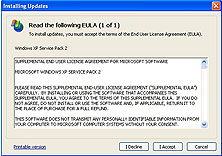 If you accept its terms, the EULA gives you permission to use the software, grants you some additional rights, and imposes certain restrictions on your use of the software. The EULA includes the "Grant of License" section, which describes how you may use the software. Also included in the EULA are restrictions against reverse engineering, leasing, or renting the software and other restrictions that apply to the particular software. In addition, the EULA describes the terms under which you may make a backup or archival copy of the software, and it details the limited warranty provided for the product.
Typical Scams
Counterfeit software can come from a number of sources. It’s important to use a reputable reseller when purchasing software or PCs that come with software. Some common scams to avoid are:- Re-bundled Software
CDs that are genuine but are not intended for resale are bundled with COAs and EULAs from illegal sources. In some cases, all of the components are genuine, but they were not produced to be sold together, which makes the whole product counterfeit. Look on CDs for text such as �Not For Resale� and on COAs for the names of companies other than those from whom you bought the software or the acronym OEM if you did not purchase the software preinstalled on a PC.
- Auction Web sites
The Business Software Alliance (BSA) estimates that "a high percentage" of software sold on auction sites is counterfeit. Sellers may claim the low price is for �liquidated product� or due to having an agreement with Microsoft. They may say that the disk is a backup copy or offer a special price for a compilation CD (with software from multiple publishers on one disk or CD).
- Spam e-mail messages
E-mail messages claiming drastically discounted prices for Microsoft software are probably scams. Many lead to flashy sites from which you can buy counterfeits at low prices. In many cases, the information you use when buying the counterfeit (name, address, credit card) is then used to commit identity theft or credit card fraud.
- Deals from other regions
Try to buy locally to avoid scams from other regions. Software is often stolen in one region and sold cheaply in another. In other instances, counterfeiters from another region may offer to let you buy multiple units of a product for a very low price so that you can sell them online, promising you will make a lot of money. Instead, you may find yourself paying large fines for dealing in counterfeits and the real counterfeiters already have your money.
- Non-Microsoft.com downloads
Microsoft does not authorize any other Web sites to offer downloads of Microsoft software. Some of these counterfeit downloads may include viruses or broken code. The only way to download genuine Microsoft software is through Microsoft.com.
- Hard disk loading
Sometimes, there�s nothing for you to look at and confirm that your software is genuine. You pay someone to install the software or you buy a PC with software pre-installed, but they don�t give you a CD, a COA, or a EULA. All you have is the software loaded on your hard disk drive. Unless your company has a volume license, you should always at least have a COA.
- Street vendors
In most regions, street vendors sell counterfeit software, either openly or to those who know the "correct" way to ask. Whether or not you have to ask for it in a special way, you can help avoid counterfeits by not purchasing from street vendors.
What is a Certificate of Authenticity (COA)?
A Certificate of Authenticity (COA) is a label that helps you identify genuine Microsoft software. A COA is not a software license - it is a visual identifier that assists in determining whether or not the Microsoft software you are running is genuine. However, without it, you will not have a legal license to run Microsoft software. A COA should never be purchased by itself without the software it authenticates.
To help you verify the authenticity of the Microsoft software you acquired, be sure that your software came with one of the following COAs (or a previous version) and that the COA includes the advanced piracy prevention features described.
Retail Software COAs
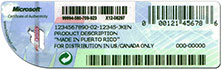 For software that is purchased separately from a computer through retail channels, the COA will be affixed to the top of the software packaging.
Large Manufacturer Pre-installed Windows COAs
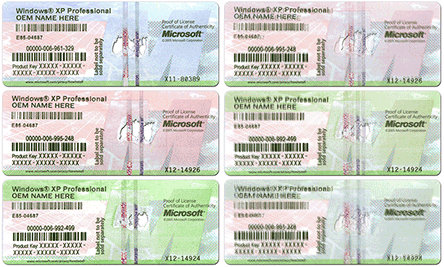 For Windows software that comes pre-installed by a large manufacturer (also known as an Original Equipment Manufacturer or OEM) on a computer, the COA should be affixed to the body of the computer. The COA includes the 25-character product key, which would be required if a reinstallation is needed.
Small Manufacturer Pre-installed Windows COAs
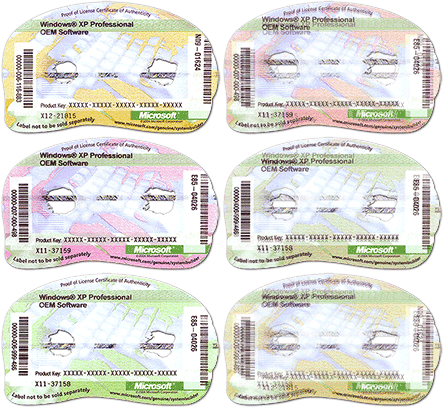 For Windows software that comes pre-installed by a small manufacturer (also known as a System Builder) on a computer, the COA is typically affixed to the body of the computer. The COA includes the 25-character product key, which would be required if a reinstallation is needed. Some System Builders include the Windows software with new computers but do not pre-install it. These computers should come with Pre-installed Windows COAs.
Pre-installed Non-Windows Software COAs
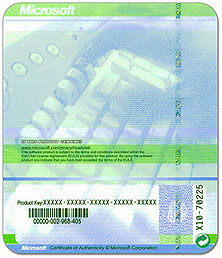 For non-Windows software (Microsoft Office for example) that comes with the purchase of a computer, the COA should be included with your system recovery disc or Office Ready PC packaging.
Embedded Windows COAs
 For Windows software that comes pre-installed on PDAs and other small devices, the COA may be affixed to the body or under the battery. Printed on the label are the product name and serial number.
Don't fall victim to stand-alone COAs
If you receive offers for COAs as stand-alone items, be aware that these offers are highly suspect and can put you at risk. To fall victim to stand-alone COAs offers means that you may have wasted valuable money and you will not have a legal license to run the software. The best way for you to protect yourself is to purchase software from a familiar, reputable reseller. The Anti-Counterfeiting Act of 2003 makes it a criminal offense for dishonest resellers to distribute stand-alone COA labels.
What is Licence Compliance?
A software licence is an agreement giving the user the right to use the software. To be "licence compliant" you simply need to have the appropriate legal licences to use all the software within your possession.What is Piracy?
Software piracy can be described as the copying of a computer software programme without the permission of the copyright owner.- End user piracy
The most common form of piracy - this involves copying a software CD for personal use or casual distribution within companies. Remember, if you do not have an additional licence for your software, you should not copy it on to another PC.
- Hard disk loading
This occurs when a System Builder takes one copy of the software and illegally installs it on more than one computer. To ensure that you are getting what you have paid for, you should always look out for the proper licence documentation when you buy any new PC that comes with pre-installed software.
- Internet piracy
If you see downloadable copies of software available on the internet, make sure that the publisher has authorised them for distribution.
- Counterfeiting
These illegal copies of the software are sophisticated and are distributed in packaging that often replicates the genuine article very realistically.
Changes to the distribution of three packs
If you open the pack, you must preinstall. If you are planning to preinstall OEM software onto new machines, buy in the correct denomination (1, 3 or 30), open the packs and distribute the individual software licences preinstalled on the new machines in your building.
If you don't open the pack, you can re-distribute to other System Builders without any hardware. If you are planning to distribute software only to other system builders, buy in the correct denomination (1, 3 or 30), don't open the pack, and redistribute unopened packs to other System Builders without any hardware.
OEM System Builder software packs are intended for PC and server manufacturers or assemblers ONLY. They are not intended for distribution to end users unless the end users are acting as System Builders by assembling their own PCs.
Common Questions:
- Why should I buy genuine Microsoft Windows Operating System software? Isn't a copied version just the same?
Buying genuine Windows software is the smart and safe choice as it provides the guaranteed reliability, security and support your business needs. Counterfeit software may appear to be the same, but it does not include any of the long-term benefits such as warranties and product updates, which are an important part of keeping your systems secure and running smoothly. Pirated software has not been tested properly and frequently has been copied thousands of times, increasing the risk of viruses infecting our hard-drive.
- Why do I need to buy an Operating System with my new PC?
Buying a new PC with Microsoft Operating System pre-installed is an easy, convenient and cost effective way for you to make sure your software is reliable and genuine. You�ll know that your software has been professionally installed with a complete version of the Operating System, including all of the necessary components. You�ll also know that the system is virus-free and comes with all the latest security enhancements.
- My old PC is running Windows 98 - can't I just transfer the licence to my new PC?
No. Original Equipment Manufacturer (OEM) System Builders� licences for Operating Systems are not transferable from one machine to another. The software is licensed with the computer systems on which it was originally installed. OEM licences are single-use licences that cannot be installed on more than one computer system. The End User Licence Agreement (EULA) states that the licence may not be shared, transferred to, or used concurrently on different computers. You must acquire a new Operating System licence for your new PC.
- I already have a volume licence agreement with Microsoft, so doesn't that give me the licence to put an Operating System on my new PC?
No it doesn't. Microsoft Volume Licensing is the licensing method available to customers who wish to acquire multiple copies of Microsoft software. The licence agreements only cover Windows Operating System upgrades, which are designed to upgrade previously acquired full Windows licences. For example, a company who has an existing PC with preinstalled Windows 2000 OEM can upgrade that licence to Windows XP via their Volume Licence agreement. In no instance does this Volume Licence agreement cover installing Windows Operating Systems on any newly-purchased PCs.
- As an academic institute we already have a Volume Licensing agreement, so why do we need another Operating System licence?
An academic Volume Licensing agreement is a flexible and economic way for schools and institutions to acquire multiple licences for software, but they only cover Windows Operating System upgrades.
Three ways a customer can tell whether they are fully licensed:- A Certificate of Authenticity (COA) is included. In the case of OEM software, it will be affixed to the chassis once installed or, in the case of retail software, to the outside of the box
- The media, manuals and components are distributed as authorised by Microsoft
- They have an official copy of the End User Licence Agreement (EULA) which explains the terms and conditions of software
Four interesting facts about the Windows Operating System- Every PC needs a licence for every software package installed
- There are only two legal ways to get a Windows licence; OEM or a Full Packaged Product
- Volume Licensing only covers Windows Operating System UPGRADES
- OEM Operating Systems live and die with each PC - THEY ARE NOT TRANSFERABLE
What is Windows Genuine Advantage (WGA)?
The Windows Genuine Advantage programme is a new initiative from Microsoft designed to offer a differentiated experience for customers who acquire genuine Microsoft Windows software.
In essence, the programme works by ensuring that only genuine Windows customers enjoy the long-term benefits of Windows Operating System software through automatic product updates. You can activate the programme by visiting the Microsoft Download Centre at www.microsoft.com/downloads
How the programme works:- Customers will be asked to enter the product key from their Windows Certificate of Authenticity in order to validate their genuine status.
- Users with invalid product keys (including invalid Volume License keys) will be blocked from genuine content on the download centre.
- A Windows custom control is downloaded to the user’s PC (with their consent) which validates that the user’s Windows software is genuine.
- If the validation is successful, the user is given their download and a certificate is stored on their machine for future use.
- If the validation fails, then the user is given the option of returning to their dealer, or providing additional information about their system.
- Users who choose not to validate, or are unable to, will be given information about genuine software and referred to their reseller or System Builder for further assistance.
To help you resolve any issues your customers may experience, we will be posting support information related to Windows Genuine Advantage on the System Builder’s web site at www.microsoft.com/oem

